


Project Overview
Subject matter
E-com App
Year
2024
Design Approach
Sprint Design
My Role
UI Designer
About Project
Bright Minds is an e-commerce app that provides parents, teachers, and educational institutions with a seamless way to purchase educational toys and learning tools designed for children of different age groups, with the aim of developing their fundamental skills in Science, Technology, Engineering, and Mathematics (STEM).
Problem
Parents and teachers face difficulties finding reliable educational toys and learning tools that are suitable for children’s age groups and educational needs in STEM fields, due to poorly organized educational stores and complicated shopping experiences.
Solution
✔︎ A simple and user-friendly interface with cheerful colors to enhance the user experience.
✔︎ Product categorization based on children’s age groups.
✔︎ Organizing educational toys and tools according to learning fields and skills.
✔︎ A secure and seamless payment experience for easier purchasing.
Future Improvements
- 📚 Creating educational activities linked to games and skills.
- 🎮 Adding interactive digital games within the application.
- 🤖 Providing smart recommendations based on the child’s age and interests.
- 🌍 Supporting multiple languages to expand accessibility and reach.
- 📚 Creating educational activities linked to games and skills.
- 🎮 Adding interactive digital games within the application.
- 🤖 Providing smart recommendations based on the child’s age and interests.
- 🌍 Supporting multiple languages to expand accessibility and reach.
Project Overview
Project Overview
Subject matter
E-com App
Year
2024
Design Approach
Sprint Design
My Role
UI Designer
About project
About project
Bright Minds is an e-commerce app that provides parents, teachers, and educational institutions with a seamless way to purchase educational toys and learning tools designed for children of different age groups, with the aim of developing their fundamental skills in Science, Technology, Engineering, and Mathematics (STEM).
problem
Parents and teachers face difficulties finding reliable educational toys and learning tools that are suitable for children’s age groups and educational needs in STEM fields, due to poorly organized educational stores and complicated shopping experiences.
solution
✔︎ A simple and user-friendly interface with cheerful colors to enhance the user experience.
✔︎ Product categorization based on children’s age groups.
✔︎ Organizing educational toys and tools according to learning fields and skills.
✔︎ A secure and seamless payment experience for easier purchasing.
Future Improvements
Future Improvements
- 📚 Creating educational activities linked to games and skills.
- 🎮 Adding interactive digital games within the application.
- 🤖 Providing smart recommendations based on the child’s age and interests.
- 🌍 Supporting multiple languages to expand accessibility and reach.

Bright minds
Bright minds
Bright minds


Screens
Screens
Screens


Onboarding
Onboarding
Onboarding
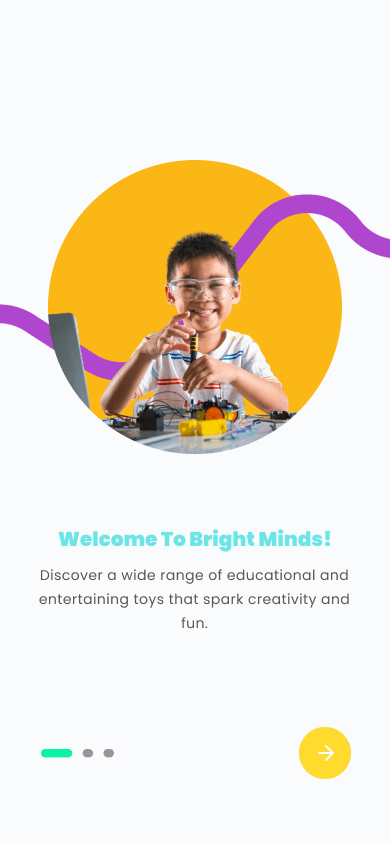
The onboarding screens introduce the application’s main features through both smart auto-scrolling and manual navigation, creating a smoother and more engaging user experience.
The onboarding screens introduce the application’s main features through both smart auto-scrolling and manual navigation, creating a smoother and more engaging user experience.
The onboarding screens introduce the application’s main features through both smart auto-scrolling and manual navigation, creating a smoother and more engaging user experience.
Sign in page
Sign in page
Sign in page
The login/sign-up pages feature a clean and elegant design that ensures a seamless user experience. A guest browsing option was also added to make the experience more convenient and accessible for users.
The login/sign-up pages feature a clean and elegant design that ensures a seamless user experience. A guest browsing option was also added to make the experience more convenient and accessible for users.
The login/sign-up pages feature a clean and elegant design that ensures a seamless user experience. A guest browsing option was also added to make the experience more convenient and accessible for users.

Home Page
Home Page
Home Page
The home screen welcomes users with a visually appealing and simple interface, including a search bar for quick and easy navigation. It also features dedicated sections for age groups, game and educational tool categories, as well as trending products.
The home screen welcomes users with a visually appealing and simple interface, including a search bar for quick and easy navigation. It also features dedicated sections for age groups, game and educational tool categories, as well as trending products.
The home screen welcomes users with a visually appealing and simple interface, including a search bar for quick and easy navigation. It also features dedicated sections for age groups, game and educational tool categories, as well as trending products.
Product Detail
Product Detail
Product Detail
This page provides concise product descriptions along with clear product images. The intuitive browsing system allows users to easily explore product options and related items, enhancing the overall shopping experience.
This page provides concise product descriptions along with clear product images. The intuitive browsing system allows users to easily explore product options and related items, enhancing the overall shopping experience.
This page provides concise product descriptions along with clear product images. The intuitive browsing system allows users to easily explore product options and related items, enhancing the overall shopping experience.


Search filter
Search filter
Search filter
A smart and simple filtering system that helps users quickly find suitable educational products based on age, category, and price range, creating a smooth and personalized browsing experience.
A smart and simple filtering system that helps users quickly find suitable educational products based on age, category, and price range, creating a smooth and personalized browsing experience.
A smart and simple filtering system that helps users quickly find suitable educational products based on age, category, and price range, creating a smooth and personalized browsing experience.
payment methods
payment methods
A clear and organized checkout experience that allows users to review their cart, select payment methods, and complete purchases smoothly and securely.
A clear and organized checkout experience that allows users to review their cart, select payment methods, and complete purchases smoothly and securely.
A clear and organized checkout experience that allows users to review their cart, select payment methods, and complete purchases smoothly and securely.


Successful payment!
Successful payment!
Successful payment!
The successful payment confirmation page is designed with simplicity and clarity to reassure the user that the transaction has been completed successfully. The message “Keep the curiosity flowing” is prominently displayed, along with a clear option to continue shopping and explore more fun, ensuring a smooth and hassle-free user experience.
The successful payment confirmation page is designed with simplicity and clarity to reassure the user that the transaction has been completed successfully. The message “Keep the curiosity flowing” is prominently displayed, along with a clear option to continue shopping and explore more fun, ensuring a smooth and hassle-free user experience.
The successful payment confirmation page is designed with simplicity and clarity to reassure the user that the transaction has been completed successfully. The message “Keep the curiosity flowing” is prominently displayed, along with a clear option to continue shopping and explore more fun, ensuring a smooth and hassle-free user experience.
Summary
In this project, I worked on designing the user experience and interface for Bright Minds, an educational e-commerce application focused on STEM learning for children. The project covered the full design process, from problem analysis and user research to creating the visual identity and designing an engaging, user-friendly interface. The main focus was on content organization, smooth navigation, and building a secure and enjoyable shopping experience tailored for both parents and educators.
You can explore the full case study, design process, and UI/UX details on Behance.
In this project, I worked on designing the user experience and interface for Bright Minds, an educational e-commerce application focused on STEM learning for children. The project covered the full design process, from problem analysis and user research to creating the visual identity and designing an engaging, user-friendly interface. The main focus was on content organization, smooth navigation, and building a secure and enjoyable shopping experience tailored for both parents and educators.
You can explore the full case study, design process, and UI/UX details on Behance.
Project Overview
Subject matter
E-com App
Year
2024
Design Approach
Sprint Design
My Role
UI Designer
About Project
Bright Minds is an e-commerce app that provides parents, teachers, and educational institutions with a seamless way to purchase educational toys and learning tools designed for children of different age groups, with the aim of developing their fundamental skills in Science, Technology, Engineering, and Mathematics (STEM).
Problem
Parents and teachers face difficulties finding reliable educational toys and learning tools that are suitable for children’s age groups and educational needs in STEM fields, due to poorly organized educational stores and complicated shopping experiences.
Solution
✔︎ A simple and user-friendly interface with cheerful colors to enhance the user experience.
✔︎ Product categorization based on children’s age groups.
✔︎ Organizing educational toys and tools according to learning fields and skills.
✔︎ A secure and seamless payment experience for easier purchasing.
Future Improvements
- 📚 Creating educational activities linked to games and skills.
- 🎮 Adding interactive digital games within the application.
- 🤖 Providing smart recommendations based on the child’s age and interests.
- 🌍 Supporting multiple languages to expand accessibility and reach.
- 📚 Creating educational activities linked to games and skills.
- 🎮 Adding interactive digital games within the application.
- 🤖 Providing smart recommendations based on the child’s age and interests.
- 🌍 Supporting multiple languages to expand accessibility and reach.
Project Overview
Project Overview
Subject matter
E-com App
Year
2024
Design Approach
Sprint Design
My Role
UI Designer
About project
About project
Bright Minds is an e-commerce app that provides parents, teachers, and educational institutions with a seamless way to purchase educational toys and learning tools designed for children of different age groups, with the aim of developing their fundamental skills in Science, Technology, Engineering, and Mathematics (STEM).
problem
Parents and teachers face difficulties finding reliable educational toys and learning tools that are suitable for children’s age groups and educational needs in STEM fields, due to poorly organized educational stores and complicated shopping experiences.
solution
✔︎ A simple and user-friendly interface with cheerful colors to enhance the user experience.
✔︎ Product categorization based on children’s age groups.
✔︎ Organizing educational toys and tools according to learning fields and skills.
✔︎ A secure and seamless payment experience for easier purchasing.
Future Improvements
Future Improvements
- 📚 Creating educational activities linked to games and skills.
- 🎮 Adding interactive digital games within the application.
- 🤖 Providing smart recommendations based on the child’s age and interests.
- 🌍 Supporting multiple languages to expand accessibility and reach.
Bright minds
Bright minds
Bright minds
Screens
Screens
Screens
Onboarding
Onboarding
Onboarding
The onboarding screens introduce the application’s main features through both smart auto-scrolling and manual navigation, creating a smoother and more engaging user experience.
The onboarding screens introduce the application’s main features through both smart auto-scrolling and manual navigation, creating a smoother and more engaging user experience.
The onboarding screens introduce the application’s main features through both smart auto-scrolling and manual navigation, creating a smoother and more engaging user experience.
Sign in page
Sign in page
Sign in page
The login/sign-up pages feature a clean and elegant design that ensures a seamless user experience. A guest browsing option was also added to make the experience more convenient and accessible for users.
The login/sign-up pages feature a clean and elegant design that ensures a seamless user experience. A guest browsing option was also added to make the experience more convenient and accessible for users.
The login/sign-up pages feature a clean and elegant design that ensures a seamless user experience. A guest browsing option was also added to make the experience more convenient and accessible for users.
Home Page
Home Page
Home Page
The home screen welcomes users with a visually appealing and simple interface, including a search bar for quick and easy navigation. It also features dedicated sections for age groups, game and educational tool categories, as well as trending products.
The home screen welcomes users with a visually appealing and simple interface, including a search bar for quick and easy navigation. It also features dedicated sections for age groups, game and educational tool categories, as well as trending products.
The home screen welcomes users with a visually appealing and simple interface, including a search bar for quick and easy navigation. It also features dedicated sections for age groups, game and educational tool categories, as well as trending products.
Product Detail
Product Detail
Product Detail
This page provides concise product descriptions along with clear product images. The intuitive browsing system allows users to easily explore product options and related items, enhancing the overall shopping experience.
This page provides concise product descriptions along with clear product images. The intuitive browsing system allows users to easily explore product options and related items, enhancing the overall shopping experience.
This page provides concise product descriptions along with clear product images. The intuitive browsing system allows users to easily explore product options and related items, enhancing the overall shopping experience.
Search filter
Search filter
Search filter
A smart and simple filtering system that helps users quickly find suitable educational products based on age, category, and price range, creating a smooth and personalized browsing experience.
A smart and simple filtering system that helps users quickly find suitable educational products based on age, category, and price range, creating a smooth and personalized browsing experience.
A smart and simple filtering system that helps users quickly find suitable educational products based on age, category, and price range, creating a smooth and personalized browsing experience.
payment methods
payment methods
A clear and organized checkout experience that allows users to review their cart, select payment methods, and complete purchases smoothly and securely.
A clear and organized checkout experience that allows users to review their cart, select payment methods, and complete purchases smoothly and securely.
A clear and organized checkout experience that allows users to review their cart, select payment methods, and complete purchases smoothly and securely.
Successful payment!
Successful payment!
Successful payment!
The successful payment confirmation page is designed with simplicity and clarity to reassure the user that the transaction has been completed successfully. The message “Keep the curiosity flowing” is prominently displayed, along with a clear option to continue shopping and explore more fun, ensuring a smooth and hassle-free user experience.
The successful payment confirmation page is designed with simplicity and clarity to reassure the user that the transaction has been completed successfully. The message “Keep the curiosity flowing” is prominently displayed, along with a clear option to continue shopping and explore more fun, ensuring a smooth and hassle-free user experience.
The successful payment confirmation page is designed with simplicity and clarity to reassure the user that the transaction has been completed successfully. The message “Keep the curiosity flowing” is prominently displayed, along with a clear option to continue shopping and explore more fun, ensuring a smooth and hassle-free user experience.
Summary
In this project, I worked on designing the user experience and interface for Bright Minds, an educational e-commerce application focused on STEM learning for children. The project covered the full design process, from problem analysis and user research to creating the visual identity and designing an engaging, user-friendly interface. The main focus was on content organization, smooth navigation, and building a secure and enjoyable shopping experience tailored for both parents and educators.
You can explore the full case study, design process, and UI/UX details on Behance.
In this project, I worked on designing the user experience and interface for Bright Minds, an educational e-commerce application focused on STEM learning for children. The project covered the full design process, from problem analysis and user research to creating the visual identity and designing an engaging, user-friendly interface. The main focus was on content organization, smooth navigation, and building a secure and enjoyable shopping experience tailored for both parents and educators.
You can explore the full case study, design process, and UI/UX details on Behance.
Project Overview
Subject matter
E-com App
Year
2024
Design Approach
Sprint Design
My Role
UI Designer
About Project
Bright Minds is an e-commerce app that provides parents, teachers, and educational institutions with a seamless way to purchase educational toys and learning tools designed for children of different age groups, with the aim of developing their fundamental skills in Science, Technology, Engineering, and Mathematics (STEM).
Problem
Parents and teachers face difficulties finding reliable educational toys and learning tools that are suitable for children’s age groups and educational needs in STEM fields, due to poorly organized educational stores and complicated shopping experiences.
Solution
✔︎ A simple and user-friendly interface with cheerful colors to enhance the user experience.
✔︎ Product categorization based on children’s age groups.
✔︎ Organizing educational toys and tools according to learning fields and skills.
✔︎ A secure and seamless payment experience for easier purchasing.
Future Improvements
- 📚 Creating educational activities linked to games and skills.
- 🎮 Adding interactive digital games within the application.
- 🤖 Providing smart recommendations based on the child’s age and interests.
- 🌍 Supporting multiple languages to expand accessibility and reach.
- 📚 Creating educational activities linked to games and skills.
- 🎮 Adding interactive digital games within the application.
- 🤖 Providing smart recommendations based on the child’s age and interests.
- 🌍 Supporting multiple languages to expand accessibility and reach.
Project Overview
Project Overview
Subject matter
E-com App
Year
2024
Design Approach
Sprint Design
My Role
UI Designer
About project
About project
Bright Minds is an e-commerce app that provides parents, teachers, and educational institutions with a seamless way to purchase educational toys and learning tools designed for children of different age groups, with the aim of developing their fundamental skills in Science, Technology, Engineering, and Mathematics (STEM).
problem
Parents and teachers face difficulties finding reliable educational toys and learning tools that are suitable for children’s age groups and educational needs in STEM fields, due to poorly organized educational stores and complicated shopping experiences.
solution
✔︎ A simple and user-friendly interface with cheerful colors to enhance the user experience.
✔︎ Product categorization based on children’s age groups.
✔︎ Organizing educational toys and tools according to learning fields and skills.
✔︎ A secure and seamless payment experience for easier purchasing.
Future Improvements
Future Improvements
- 📚 Creating educational activities linked to games and skills.
- 🎮 Adding interactive digital games within the application.
- 🤖 Providing smart recommendations based on the child’s age and interests.
- 🌍 Supporting multiple languages to expand accessibility and reach.
Bright minds
Bright minds
Bright minds
Screens
Screens
Screens
Onboarding
Onboarding
Onboarding
The onboarding screens introduce the application’s main features through both smart auto-scrolling and manual navigation, creating a smoother and more engaging user experience.
The onboarding screens introduce the application’s main features through both smart auto-scrolling and manual navigation, creating a smoother and more engaging user experience.
The onboarding screens introduce the application’s main features through both smart auto-scrolling and manual navigation, creating a smoother and more engaging user experience.
Sign in page
Sign in page
Sign in page
The login/sign-up pages feature a clean and elegant design that ensures a seamless user experience. A guest browsing option was also added to make the experience more convenient and accessible for users.
The login/sign-up pages feature a clean and elegant design that ensures a seamless user experience. A guest browsing option was also added to make the experience more convenient and accessible for users.
The login/sign-up pages feature a clean and elegant design that ensures a seamless user experience. A guest browsing option was also added to make the experience more convenient and accessible for users.
Home Page
Home Page
Home Page
The home screen welcomes users with a visually appealing and simple interface, including a search bar for quick and easy navigation. It also features dedicated sections for age groups, game and educational tool categories, as well as trending products.
The home screen welcomes users with a visually appealing and simple interface, including a search bar for quick and easy navigation. It also features dedicated sections for age groups, game and educational tool categories, as well as trending products.
The home screen welcomes users with a visually appealing and simple interface, including a search bar for quick and easy navigation. It also features dedicated sections for age groups, game and educational tool categories, as well as trending products.
Product Detail
Product Detail
Product Detail
This page provides concise product descriptions along with clear product images. The intuitive browsing system allows users to easily explore product options and related items, enhancing the overall shopping experience.
This page provides concise product descriptions along with clear product images. The intuitive browsing system allows users to easily explore product options and related items, enhancing the overall shopping experience.
This page provides concise product descriptions along with clear product images. The intuitive browsing system allows users to easily explore product options and related items, enhancing the overall shopping experience.
Search filter
Search filter
Search filter
A smart and simple filtering system that helps users quickly find suitable educational products based on age, category, and price range, creating a smooth and personalized browsing experience.
A smart and simple filtering system that helps users quickly find suitable educational products based on age, category, and price range, creating a smooth and personalized browsing experience.
A smart and simple filtering system that helps users quickly find suitable educational products based on age, category, and price range, creating a smooth and personalized browsing experience.
payment methods
payment methods
A clear and organized checkout experience that allows users to review their cart, select payment methods, and complete purchases smoothly and securely.
A clear and organized checkout experience that allows users to review their cart, select payment methods, and complete purchases smoothly and securely.
A clear and organized checkout experience that allows users to review their cart, select payment methods, and complete purchases smoothly and securely.
Successful payment!
Successful payment!
Successful payment!
The successful payment confirmation page is designed with simplicity and clarity to reassure the user that the transaction has been completed successfully. The message “Keep the curiosity flowing” is prominently displayed, along with a clear option to continue shopping and explore more fun, ensuring a smooth and hassle-free user experience.
The successful payment confirmation page is designed with simplicity and clarity to reassure the user that the transaction has been completed successfully. The message “Keep the curiosity flowing” is prominently displayed, along with a clear option to continue shopping and explore more fun, ensuring a smooth and hassle-free user experience.
The successful payment confirmation page is designed with simplicity and clarity to reassure the user that the transaction has been completed successfully. The message “Keep the curiosity flowing” is prominently displayed, along with a clear option to continue shopping and explore more fun, ensuring a smooth and hassle-free user experience.
Summary
In this project, I worked on designing the user experience and interface for Bright Minds, an educational e-commerce application focused on STEM learning for children. The project covered the full design process, from problem analysis and user research to creating the visual identity and designing an engaging, user-friendly interface. The main focus was on content organization, smooth navigation, and building a secure and enjoyable shopping experience tailored for both parents and educators.
You can explore the full case study, design process, and UI/UX details on Behance.
In this project, I worked on designing the user experience and interface for Bright Minds, an educational e-commerce application focused on STEM learning for children. The project covered the full design process, from problem analysis and user research to creating the visual identity and designing an engaging, user-friendly interface. The main focus was on content organization, smooth navigation, and building a secure and enjoyable shopping experience tailored for both parents and educators.
You can explore the full case study, design process, and UI/UX details on Behance.