


Project Overview
Subject matter
Education
Year
2024
Design Approach
Sprint Design
My Role
UI Designer
About Project
EduMAte is a smart companion that walks alongside students every step of their academic journey. It organizes tasks, helps solve assignments, and offers personalized financial tips and study resources. It celebrates achievements with medals and rewards to keep students motivated, and brings them together through a vibrant community to connect and support one another. More than just an app, it's the companion every student wishes they had.
Problem & pain points
University students juggle too many challenges at once, making it hard to stay on top of academic life.
Time Management: Students struggle to balance study time with other responsibilities.
Complex Assignments: Some tasks require extra research and effort beyond the classroom.
Lack of Focus: Constant distractions make it difficult to concentrate and stay productive.
Limited Study Resources: Finding reliable learning materials takes time and effort.
Financial Management: Tracking monthly allowances and expenses often goes unmanaged.
Limited Social Interaction: New or remote students find it hard to build connections and engage in campus life.
Solution
✔︎ AI Assignment Assistant: Scans files, solves assignments, and provides performance feedback.
✔︎ Personalized Study Plans: Generates custom plans based on the student's schedule and needs.
✔︎ Smart Notes Organization: Automatically sorts notes by topic for easier search and review.
✔︎ Learning Resource Suggestions: Recommends tailored books and courses based on interests.
✔︎ Smart Task & Deadline Alerts: Sends reminders for upcoming exams and tracks performance.
✔︎ Financial Allowance Manager: Tracks monthly allowances and helps manage expenses.
✔︎ Student Community: Connect with peers, join study groups, and share experiences.
✔︎ Study with AI: Focused study environment using Pomodoro and other concentration techniques.
✔︎ AI Assignment Assistant: Scans files, solves assignments, and provides performance feedback.
✔︎ Personalized Study Plans: Generates custom plans based on the student's schedule and needs.
✔︎ Smart Notes Organization: Automatically sorts notes by topic for easier search and review.
✔︎ Learning Resource Suggestions: Recommends tailored books and courses based on interests.
✔︎ Smart Task & Deadline Alerts: Sends reminders for upcoming exams and tracks performance.
✔︎ Financial Allowance Manager: Tracks monthly allowances and helps manage expenses.
✔︎ Student Community: Connect with peers, join study groups, and share experiences.
✔︎ Study with AI: Focused study environment using Pomodoro and other concentration techniques.
Future Improvements
- 🤝 Interest-Based Communities: Enables students to connect with peers who share the same major, university, and interests.
- 🏫 Integration with Saudi University Platforms: The app connects with university portals, allowing the AI to recommend workshops and seminars both on and off campus.
- 📢 Event & Opportunity Notifications: Automatically highlights exhibitions, courses, and seminars so students never miss opportunities relevant to them.


EduMate
EduMate
EduMate

Screens
Screens
Screens


Onboarding
Onboarding
Onboarding
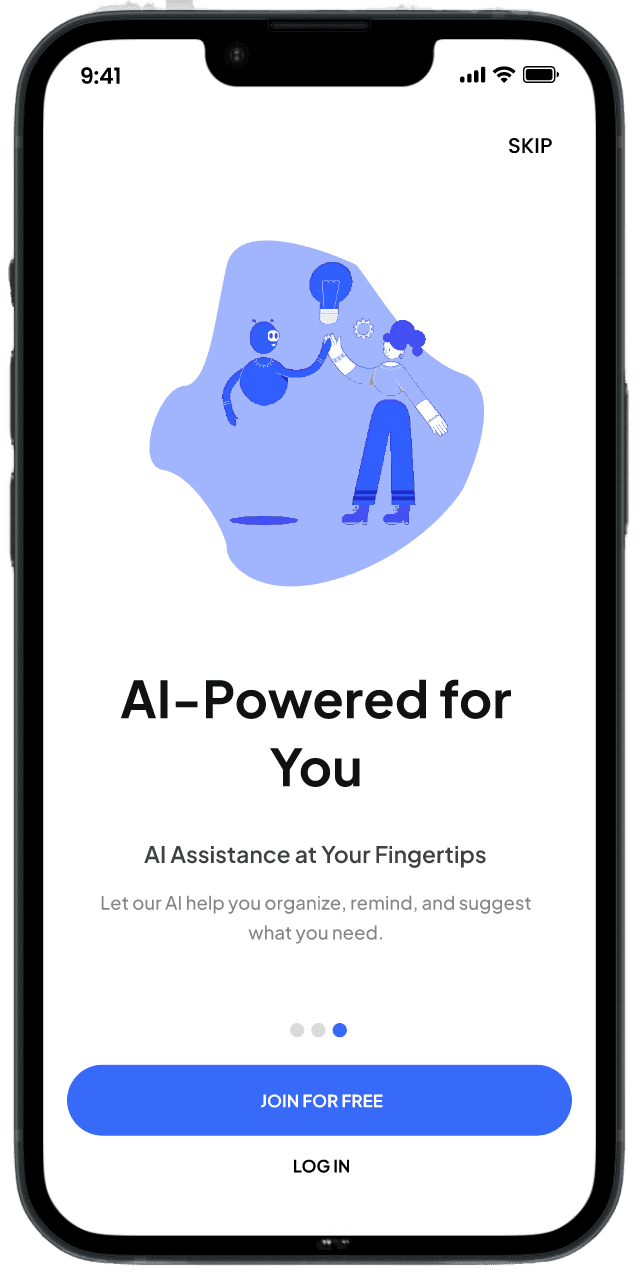
The onboarding screen provides a seamless introduction to the app's features, incorporating animated graphics and an overview of the app.
The onboarding screen provides a seamless introduction to the app's features, incorporating animated graphics and an overview of the app.
The onboarding screen provides a seamless introduction to the app's features, incorporating animated graphics and an overview of the app.
Sign in page
Sign in page
Sign in page
The login/signup page boasts a clean and minimalist design, ensuring a hassle-free user experience. Its intuitive layout guides users smoothly through the process, making account creation or access quick and easy.
The login/signup page boasts a clean and minimalist design, ensuring a hassle-free user experience. Its intuitive layout guides users smoothly through the process, making account creation or access quick and easy.
The login/signup page boasts a clean and minimalist design, ensuring a hassle-free user experience. Its intuitive layout guides users smoothly through the process, making account creation or access quick and easy.

Onboarding Questionnaire
Onboarding Questionnaire
Onboarding Questionnaire
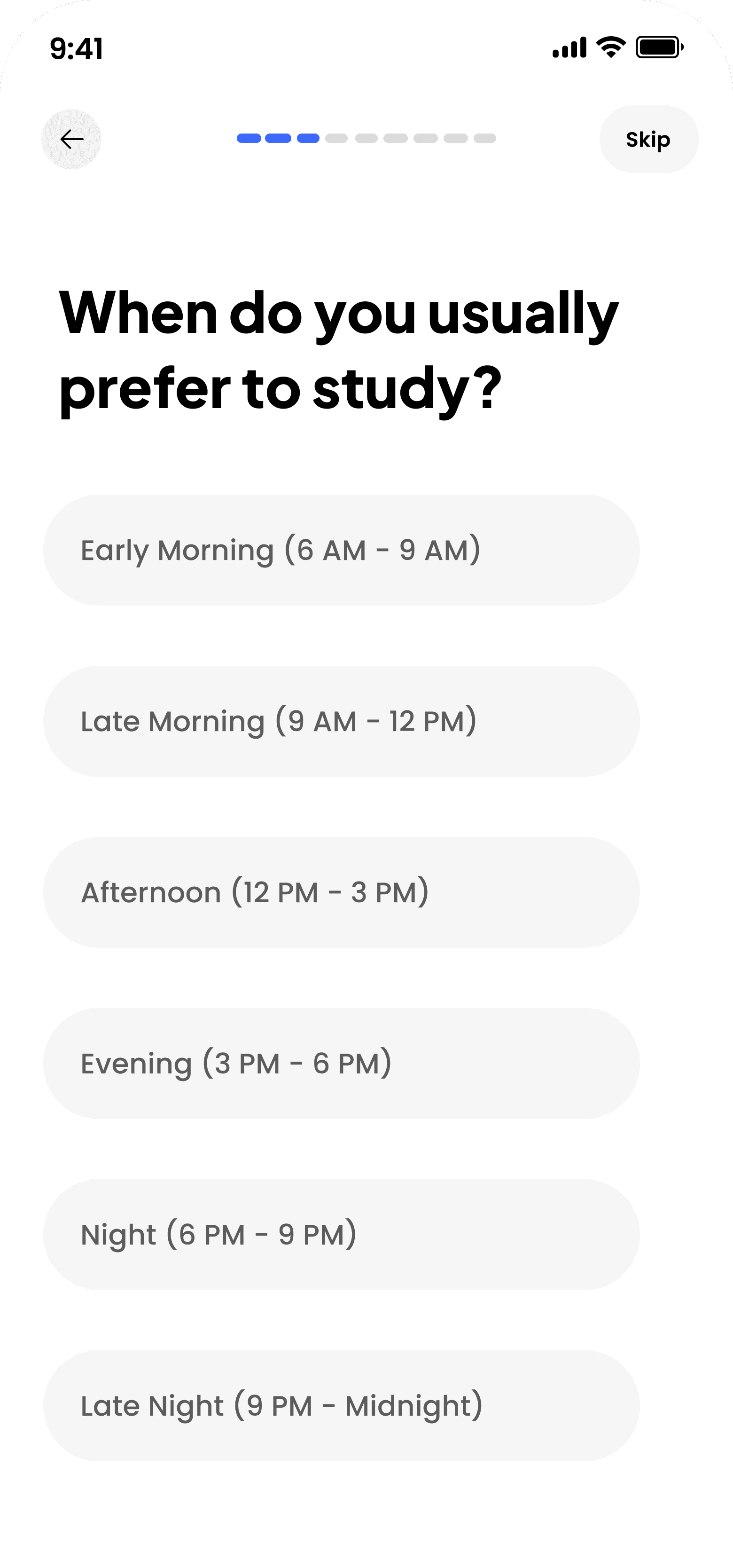
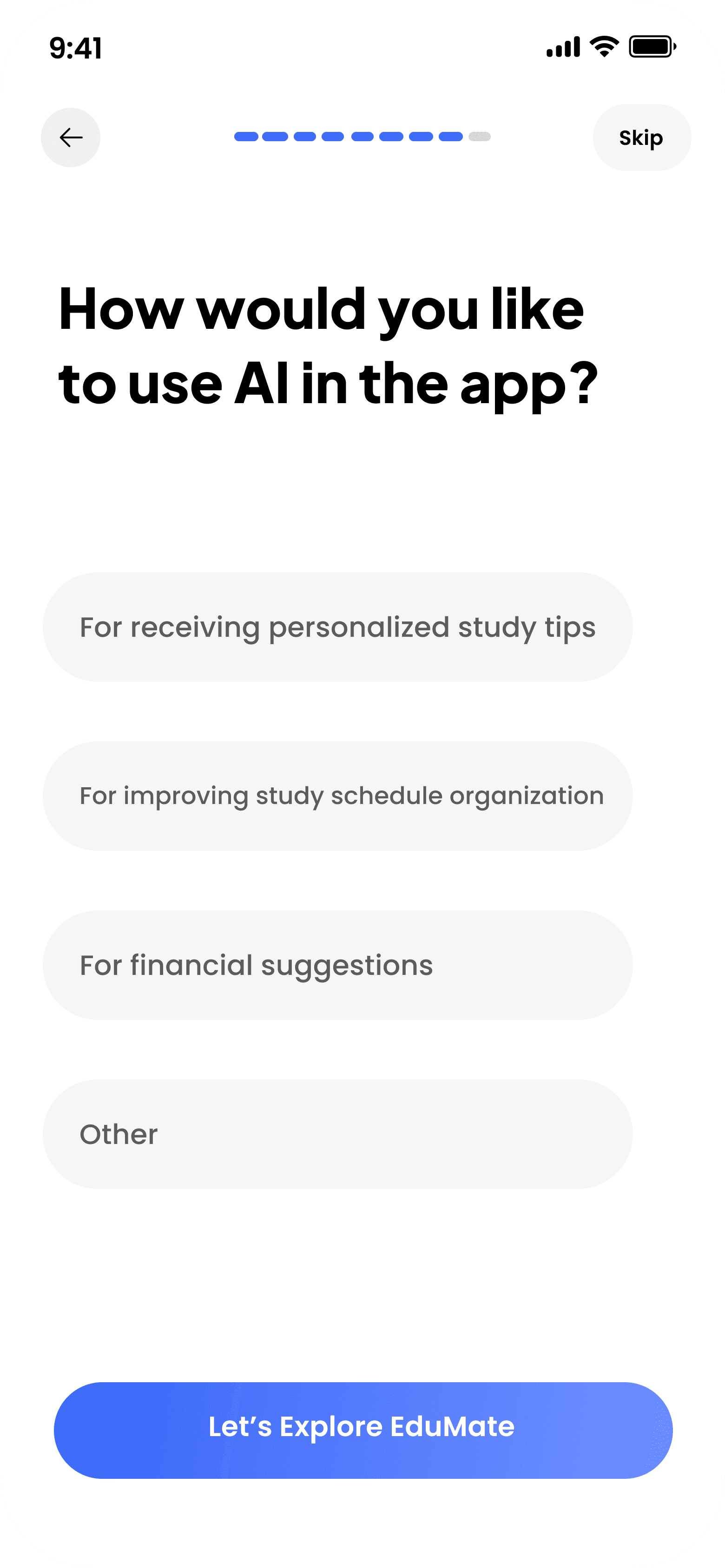
This step aims to collect essential user information in order to provide personalized content and tailor the app interface to suit their needs from the very beginning.
This step aims to collect essential user information in order to provide personalized content and tailor the app interface to suit their needs from the very beginning.



Home Page
Home Page
Home Page
The Edumate home screen was designed to bring students’ essential needs into one seamless interface — starting with quick access to AI-powered interactions through camera scanning, text-based chat, and voice conversation. It also features a concise interactive dashboard for tracking academic progress, along with highlighting important upcoming events such as assignments, exams, and scholarship payment dates.
The Edumate home screen was designed to bring students’ essential needs into one seamless interface — starting with quick access to AI-powered interactions through camera scanning, text-based chat, and voice conversation. It also features a concise interactive dashboard for tracking academic progress, along with highlighting important upcoming events such as assignments, exams, and scholarship payment dates.

9:41
9:41
9:41

9:41
9:41
9:41
Ai Chat Assistant
Ai Chat Assistant
Ai Chat Assistant
This is the Edumate AI Assistant screen, designed to help students ask questions, seek support, and receive instant assistance. Students can either type their own requests or choose from ready-made suggestions such as task organization or grade improvement. The interface is simple and interactive, featuring a text input field, voice recording option, and clear prompts that enable students to get quick and effective support.
This is the Edumate AI Assistant screen, designed to help students ask questions, seek support, and receive instant assistance. Students can either type their own requests or choose from ready-made suggestions such as task organization or grade improvement. The interface is simple and interactive, featuring a text input field, voice recording option, and clear prompts that enable students to get quick and effective support.
Ai Homework Assistant
Ai Homework Assistant
Ai Homework Assistant
The AI-Powered Revision Assistant in Edumate is an innovative feature designed to help students review and retain their study materials through personalized support tailored to each student. By uploading files, the AI can scan and analyze the content, then generate similar practice questions to help students strengthen their understanding and improve mastery of the subject. The goal of this feature is to enhance academic comprehension and boost students’ confidence in their studies.
The AI-Powered Revision Assistant in Edumate is an innovative feature designed to help students review and retain their study materials through personalized support tailored to each student. By uploading files, the AI can scan and analyze the content, then generate similar practice questions to help students strengthen their understanding and improve mastery of the subject. The goal of this feature is to enhance academic comprehension and boost students’ confidence in their studies.


Recent
Recent
Recent
All
All
All











Upload you homework photo here
Upload you homework photo here
Upload you homework photo here



Achievements
Achievements
Achievements
The Achievements Page in EduMate showcases students’ progress and accomplishments through engaging and motivating visuals. It features achievement streaks that track consecutive days of productivity and progress in tasks and assignments, encouraging students to stay consistent. The page also highlights badges earned through continuous engagement and completing specific in-app activities. By visually emphasizing achievements and milestones, this page aims to boost students’ confidence, motivation, and overall academic experience.
The Achievements Page in EduMate showcases students’ progress and accomplishments through engaging and motivating visuals. It features achievement streaks that track consecutive days of productivity and progress in tasks and assignments, encouraging students to stay consistent. The page also highlights badges earned through continuous engagement and completing specific in-app activities. By visually emphasizing achievements and milestones, this page aims to boost students’ confidence, motivation, and overall academic experience.
Project Overview
Subject matter
Education
Year
2024
Design Approach
Sprint Design
My Role
UI Designer
About project
EduMAte is a smart companion that walks alongside students every step of their academic journey. It organizes tasks, helps solve assignments, and offers personalized financial tips and study resources. It celebrates achievements with medals and rewards to keep students motivated, and brings them together through a vibrant community to connect and support one another. More than just an app, it's the companion every student wishes they had.
Problem & pain points
University students juggle too many challenges at once, making it hard to stay on top of academic life.
Time Management: Students struggle to balance study time with other responsibilities.
Complex Assignments: Some tasks require extra research and effort beyond the classroom.
Lack of Focus: Constant distractions make it difficult to concentrate and stay productive.
Limited Study Resources: Finding reliable learning materials takes time and effort.
Financial Management: Tracking monthly allowances and expenses often goes unmanaged.
Limited Social Interaction: New or remote students find it hard to build connections and engage in campus life.
solution
✔︎ AI Assignment Assistant: Scans files, solves assignments, and provides performance feedback.
✔︎ Personalized Study Plans: Generates custom plans based on the student's schedule and needs.
✔︎ Smart Notes Organization: Automatically sorts notes by topic for easier search and review.
✔︎ Learning Resource Suggestions: Recommends tailored books and courses based on interests.
✔︎ Smart Task & Deadline Alerts: Sends reminders for upcoming exams and tracks performance.
✔︎ Financial Allowance Manager: Tracks monthly allowances and helps manage expenses.
✔︎ Student Community: Connect with peers, join study groups, and share experiences.
✔︎ Study with AI: Focused study environment using Pomodoro and other concentration techniques.
challenge
- 🤝 Interest-Based Communities: Allow students to discover peers from the same field, university, and shared interests.
- 🏫 University Integration: Connect the app to Saudi university portals to let the AI suggest relevant workshops and seminars on and off campus.
- 📢 Events & Opportunities Awareness: Automatically highlight exhibitions, courses, and seminars so students never miss what matters.

Summary
EduMAte was born from a personal struggle as a student in a demanding practical major — scattered tasks, missed deadlines, and no single tool that truly helped. That frustration became the spark. The project went through a full design process: from deep-diving into student pain points and user research, to crafting the screens, building a cohesive design system, and mapping out a clear user flow across the app.
EduMAte was born from a personal struggle as a student in a demanding practical major — scattered tasks, missed deadlines, and no single tool that truly helped. That frustration became the spark. The project went through a full design process: from deep-diving into student pain points and user research, to crafting the screens, building a cohesive design system, and mapping out a clear user flow across the app.
Project Overview
Subject matter
Education
Year
2024
Design Approach
Sprint Design
My Role
UI Designer
About Project
EduMAte is a smart companion that walks alongside students every step of their academic journey. It organizes tasks, helps solve assignments, and offers personalized financial tips and study resources. It celebrates achievements with medals and rewards to keep students motivated, and brings them together through a vibrant community to connect and support one another. More than just an app, it's the companion every student wishes they had.
Problem & pain points
University students juggle too many challenges at once, making it hard to stay on top of academic life.
Time Management: Students struggle to balance study time with other responsibilities.
Complex Assignments: Some tasks require extra research and effort beyond the classroom.
Lack of Focus: Constant distractions make it difficult to concentrate and stay productive.
Limited Study Resources: Finding reliable learning materials takes time and effort.
Financial Management: Tracking monthly allowances and expenses often goes unmanaged.
Limited Social Interaction: New or remote students find it hard to build connections and engage in campus life.
Solution
✔︎ AI Assignment Assistant: Scans files, solves assignments, and provides performance feedback.
✔︎ Personalized Study Plans: Generates custom plans based on the student's schedule and needs.
✔︎ Smart Notes Organization: Automatically sorts notes by topic for easier search and review.
✔︎ Learning Resource Suggestions: Recommends tailored books and courses based on interests.
✔︎ Smart Task & Deadline Alerts: Sends reminders for upcoming exams and tracks performance.
✔︎ Financial Allowance Manager: Tracks monthly allowances and helps manage expenses.
✔︎ Student Community: Connect with peers, join study groups, and share experiences.
✔︎ Study with AI: Focused study environment using Pomodoro and other concentration techniques.
✔︎ AI Assignment Assistant: Scans files, solves assignments, and provides performance feedback.
✔︎ Personalized Study Plans: Generates custom plans based on the student's schedule and needs.
✔︎ Smart Notes Organization: Automatically sorts notes by topic for easier search and review.
✔︎ Learning Resource Suggestions: Recommends tailored books and courses based on interests.
✔︎ Smart Task & Deadline Alerts: Sends reminders for upcoming exams and tracks performance.
✔︎ Financial Allowance Manager: Tracks monthly allowances and helps manage expenses.
✔︎ Student Community: Connect with peers, join study groups, and share experiences.
✔︎ Study with AI: Focused study environment using Pomodoro and other concentration techniques.
Future Improvements
- 🤝 Interest-Based Communities: Enables students to connect with peers who share the same major, university, and interests.
- 🏫 Integration with Saudi University Platforms: The app connects with university portals, allowing the AI to recommend workshops and seminars both on and off campus.
- 📢 Event & Opportunity Notifications: Automatically highlights exhibitions, courses, and seminars so students never miss opportunities relevant to them.
EduMate
EduMate
EduMate
Screens
Screens
Screens
Onboarding
Onboarding
Onboarding
The onboarding screen provides a seamless introduction to the app's features, incorporating animated graphics and an overview of the app.
The onboarding screen provides a seamless introduction to the app's features, incorporating animated graphics and an overview of the app.
The onboarding screen provides a seamless introduction to the app's features, incorporating animated graphics and an overview of the app.
Sign in page
Sign in page
Sign in page
The login/signup page boasts a clean and minimalist design, ensuring a hassle-free user experience. Its intuitive layout guides users smoothly through the process, making account creation or access quick and easy.
The login/signup page boasts a clean and minimalist design, ensuring a hassle-free user experience. Its intuitive layout guides users smoothly through the process, making account creation or access quick and easy.
The login/signup page boasts a clean and minimalist design, ensuring a hassle-free user experience. Its intuitive layout guides users smoothly through the process, making account creation or access quick and easy.
Onboarding Questionnaire
Onboarding Questionnaire
Onboarding Questionnaire
This step aims to collect essential user information in order to provide personalized content and tailor the app interface to suit their needs from the very beginning.
This step aims to collect essential user information in order to provide personalized content and tailor the app interface to suit their needs from the very beginning.
Home Page
Home Page
Home Page
The Edumate home screen was designed to bring students’ essential needs into one seamless interface — starting with quick access to AI-powered interactions through camera scanning, text-based chat, and voice conversation. It also features a concise interactive dashboard for tracking academic progress, along with highlighting important upcoming events such as assignments, exams, and scholarship payment dates.
The Edumate home screen was designed to bring students’ essential needs into one seamless interface — starting with quick access to AI-powered interactions through camera scanning, text-based chat, and voice conversation. It also features a concise interactive dashboard for tracking academic progress, along with highlighting important upcoming events such as assignments, exams, and scholarship payment dates.
9:41
9:41
9:41
9:41
9:41
9:41
Ai Chat Assistant
Ai Chat Assistant
Ai Chat Assistant
This is the Edumate AI Assistant screen, designed to help students ask questions, seek support, and receive instant assistance. Students can either type their own requests or choose from ready-made suggestions such as task organization or grade improvement. The interface is simple and interactive, featuring a text input field, voice recording option, and clear prompts that enable students to get quick and effective support.
This is the Edumate AI Assistant screen, designed to help students ask questions, seek support, and receive instant assistance. Students can either type their own requests or choose from ready-made suggestions such as task organization or grade improvement. The interface is simple and interactive, featuring a text input field, voice recording option, and clear prompts that enable students to get quick and effective support.
Ai Homework Assistant
Ai Homework Assistant
Ai Homework Assistant
The AI-Powered Revision Assistant in Edumate is an innovative feature designed to help students review and retain their study materials through personalized support tailored to each student. By uploading files, the AI can scan and analyze the content, then generate similar practice questions to help students strengthen their understanding and improve mastery of the subject. The goal of this feature is to enhance academic comprehension and boost students’ confidence in their studies.
The AI-Powered Revision Assistant in Edumate is an innovative feature designed to help students review and retain their study materials through personalized support tailored to each student. By uploading files, the AI can scan and analyze the content, then generate similar practice questions to help students strengthen their understanding and improve mastery of the subject. The goal of this feature is to enhance academic comprehension and boost students’ confidence in their studies.
Recent
Recent
Recent
All
All
All
Upload you homework photo here
Upload you homework photo here
Upload you homework photo here
Achievements
Achievements
Achievements
The Achievements Page in EduMate showcases students’ progress and accomplishments through engaging and motivating visuals. It features achievement streaks that track consecutive days of productivity and progress in tasks and assignments, encouraging students to stay consistent. The page also highlights badges earned through continuous engagement and completing specific in-app activities. By visually emphasizing achievements and milestones, this page aims to boost students’ confidence, motivation, and overall academic experience.
The Achievements Page in EduMate showcases students’ progress and accomplishments through engaging and motivating visuals. It features achievement streaks that track consecutive days of productivity and progress in tasks and assignments, encouraging students to stay consistent. The page also highlights badges earned through continuous engagement and completing specific in-app activities. By visually emphasizing achievements and milestones, this page aims to boost students’ confidence, motivation, and overall academic experience.
Project Overview
Subject matter
Education
Year
2024
Design Approach
Sprint Design
My Role
UI Designer
About project
EduMAte is a smart companion that walks alongside students every step of their academic journey. It organizes tasks, helps solve assignments, and offers personalized financial tips and study resources. It celebrates achievements with medals and rewards to keep students motivated, and brings them together through a vibrant community to connect and support one another. More than just an app, it's the companion every student wishes they had.
Problem & pain points
University students juggle too many challenges at once, making it hard to stay on top of academic life.
Time Management: Students struggle to balance study time with other responsibilities.
Complex Assignments: Some tasks require extra research and effort beyond the classroom.
Lack of Focus: Constant distractions make it difficult to concentrate and stay productive.
Limited Study Resources: Finding reliable learning materials takes time and effort.
Financial Management: Tracking monthly allowances and expenses often goes unmanaged.
Limited Social Interaction: New or remote students find it hard to build connections and engage in campus life.
solution
✔︎ AI Assignment Assistant: Scans files, solves assignments, and provides performance feedback.
✔︎ Personalized Study Plans: Generates custom plans based on the student's schedule and needs.
✔︎ Smart Notes Organization: Automatically sorts notes by topic for easier search and review.
✔︎ Learning Resource Suggestions: Recommends tailored books and courses based on interests.
✔︎ Smart Task & Deadline Alerts: Sends reminders for upcoming exams and tracks performance.
✔︎ Financial Allowance Manager: Tracks monthly allowances and helps manage expenses.
✔︎ Student Community: Connect with peers, join study groups, and share experiences.
✔︎ Study with AI: Focused study environment using Pomodoro and other concentration techniques.
challenge
- 🤝 Interest-Based Communities: Allow students to discover peers from the same field, university, and shared interests.
- 🏫 University Integration: Connect the app to Saudi university portals to let the AI suggest relevant workshops and seminars on and off campus.
- 📢 Events & Opportunities Awareness: Automatically highlight exhibitions, courses, and seminars so students never miss what matters.
Summary
EduMAte was born from a personal struggle as a student in a demanding practical major — scattered tasks, missed deadlines, and no single tool that truly helped. That frustration became the spark. The project went through a full design process: from deep-diving into student pain points and user research, to crafting the screens, building a cohesive design system, and mapping out a clear user flow across the app.
EduMAte was born from a personal struggle as a student in a demanding practical major — scattered tasks, missed deadlines, and no single tool that truly helped. That frustration became the spark. The project went through a full design process: from deep-diving into student pain points and user research, to crafting the screens, building a cohesive design system, and mapping out a clear user flow across the app.
Project Overview
Subject matter
Education
Year
2024
Design Approach
Sprint Design
My Role
UI Designer
About Project
EduMAte is a smart companion that walks alongside students every step of their academic journey. It organizes tasks, helps solve assignments, and offers personalized financial tips and study resources. It celebrates achievements with medals and rewards to keep students motivated, and brings them together through a vibrant community to connect and support one another. More than just an app, it's the companion every student wishes they had.
Problem & pain points
University students juggle too many challenges at once, making it hard to stay on top of academic life.
Time Management: Students struggle to balance study time with other responsibilities.
Complex Assignments: Some tasks require extra research and effort beyond the classroom.
Lack of Focus: Constant distractions make it difficult to concentrate and stay productive.
Limited Study Resources: Finding reliable learning materials takes time and effort.
Financial Management: Tracking monthly allowances and expenses often goes unmanaged.
Limited Social Interaction: New or remote students find it hard to build connections and engage in campus life.
Solution
✔︎ AI Assignment Assistant: Scans files, solves assignments, and provides performance feedback.
✔︎ Personalized Study Plans: Generates custom plans based on the student's schedule and needs.
✔︎ Smart Notes Organization: Automatically sorts notes by topic for easier search and review.
✔︎ Learning Resource Suggestions: Recommends tailored books and courses based on interests.
✔︎ Smart Task & Deadline Alerts: Sends reminders for upcoming exams and tracks performance.
✔︎ Financial Allowance Manager: Tracks monthly allowances and helps manage expenses.
✔︎ Student Community: Connect with peers, join study groups, and share experiences.
✔︎ Study with AI: Focused study environment using Pomodoro and other concentration techniques.
✔︎ AI Assignment Assistant: Scans files, solves assignments, and provides performance feedback.
✔︎ Personalized Study Plans: Generates custom plans based on the student's schedule and needs.
✔︎ Smart Notes Organization: Automatically sorts notes by topic for easier search and review.
✔︎ Learning Resource Suggestions: Recommends tailored books and courses based on interests.
✔︎ Smart Task & Deadline Alerts: Sends reminders for upcoming exams and tracks performance.
✔︎ Financial Allowance Manager: Tracks monthly allowances and helps manage expenses.
✔︎ Student Community: Connect with peers, join study groups, and share experiences.
✔︎ Study with AI: Focused study environment using Pomodoro and other concentration techniques.
Future Improvements
- 🤝 Interest-Based Communities: Enables students to connect with peers who share the same major, university, and interests.
- 🏫 Integration with Saudi University Platforms: The app connects with university portals, allowing the AI to recommend workshops and seminars both on and off campus.
- 📢 Event & Opportunity Notifications: Automatically highlights exhibitions, courses, and seminars so students never miss opportunities relevant to them.
EduMate
EduMate
EduMate
Screens
Screens
Screens
Onboarding
Onboarding
Onboarding
The onboarding screen provides a seamless introduction to the app's features, incorporating animated graphics and an overview of the app.
The onboarding screen provides a seamless introduction to the app's features, incorporating animated graphics and an overview of the app.
The onboarding screen provides a seamless introduction to the app's features, incorporating animated graphics and an overview of the app.
Sign in page
Sign in page
Sign in page
The login/signup page boasts a clean and minimalist design, ensuring a hassle-free user experience. Its intuitive layout guides users smoothly through the process, making account creation or access quick and easy.
The login/signup page boasts a clean and minimalist design, ensuring a hassle-free user experience. Its intuitive layout guides users smoothly through the process, making account creation or access quick and easy.
The login/signup page boasts a clean and minimalist design, ensuring a hassle-free user experience. Its intuitive layout guides users smoothly through the process, making account creation or access quick and easy.
Onboarding Questionnaire
Onboarding Questionnaire
Onboarding Questionnaire
This step aims to collect essential user information in order to provide personalized content and tailor the app interface to suit their needs from the very beginning.
This step aims to collect essential user information in order to provide personalized content and tailor the app interface to suit their needs from the very beginning.
Home Page
Home Page
Home Page
The Edumate home screen was designed to bring students’ essential needs into one seamless interface — starting with quick access to AI-powered interactions through camera scanning, text-based chat, and voice conversation. It also features a concise interactive dashboard for tracking academic progress, along with highlighting important upcoming events such as assignments, exams, and scholarship payment dates.
The Edumate home screen was designed to bring students’ essential needs into one seamless interface — starting with quick access to AI-powered interactions through camera scanning, text-based chat, and voice conversation. It also features a concise interactive dashboard for tracking academic progress, along with highlighting important upcoming events such as assignments, exams, and scholarship payment dates.
9:41
9:41
9:41
9:41
9:41
9:41
Ai Chat Assistant
Ai Chat Assistant
Ai Chat Assistant
This is the Edumate AI Assistant screen, designed to help students ask questions, seek support, and receive instant assistance. Students can either type their own requests or choose from ready-made suggestions such as task organization or grade improvement. The interface is simple and interactive, featuring a text input field, voice recording option, and clear prompts that enable students to get quick and effective support.
This is the Edumate AI Assistant screen, designed to help students ask questions, seek support, and receive instant assistance. Students can either type their own requests or choose from ready-made suggestions such as task organization or grade improvement. The interface is simple and interactive, featuring a text input field, voice recording option, and clear prompts that enable students to get quick and effective support.
Ai Homework Assistant
Ai Homework Assistant
Ai Homework Assistant
The AI-Powered Revision Assistant in Edumate is an innovative feature designed to help students review and retain their study materials through personalized support tailored to each student. By uploading files, the AI can scan and analyze the content, then generate similar practice questions to help students strengthen their understanding and improve mastery of the subject. The goal of this feature is to enhance academic comprehension and boost students’ confidence in their studies.
The AI-Powered Revision Assistant in Edumate is an innovative feature designed to help students review and retain their study materials through personalized support tailored to each student. By uploading files, the AI can scan and analyze the content, then generate similar practice questions to help students strengthen their understanding and improve mastery of the subject. The goal of this feature is to enhance academic comprehension and boost students’ confidence in their studies.
Recent
Recent
Recent
All
All
All
Upload you homework photo here
Upload you homework photo here
Upload you homework photo here
Achievements
Achievements
Achievements
The Achievements Page in EduMate showcases students’ progress and accomplishments through engaging and motivating visuals. It features achievement streaks that track consecutive days of productivity and progress in tasks and assignments, encouraging students to stay consistent. The page also highlights badges earned through continuous engagement and completing specific in-app activities. By visually emphasizing achievements and milestones, this page aims to boost students’ confidence, motivation, and overall academic experience.
The Achievements Page in EduMate showcases students’ progress and accomplishments through engaging and motivating visuals. It features achievement streaks that track consecutive days of productivity and progress in tasks and assignments, encouraging students to stay consistent. The page also highlights badges earned through continuous engagement and completing specific in-app activities. By visually emphasizing achievements and milestones, this page aims to boost students’ confidence, motivation, and overall academic experience.
Project Overview
Subject matter
Education
Year
2024
Design Approach
Sprint Design
My Role
UI Designer
About project
EduMAte is a smart companion that walks alongside students every step of their academic journey. It organizes tasks, helps solve assignments, and offers personalized financial tips and study resources. It celebrates achievements with medals and rewards to keep students motivated, and brings them together through a vibrant community to connect and support one another. More than just an app, it's the companion every student wishes they had.
Problem & pain points
University students juggle too many challenges at once, making it hard to stay on top of academic life.
Time Management: Students struggle to balance study time with other responsibilities.
Complex Assignments: Some tasks require extra research and effort beyond the classroom.
Lack of Focus: Constant distractions make it difficult to concentrate and stay productive.
Limited Study Resources: Finding reliable learning materials takes time and effort.
Financial Management: Tracking monthly allowances and expenses often goes unmanaged.
Limited Social Interaction: New or remote students find it hard to build connections and engage in campus life.
solution
✔︎ AI Assignment Assistant: Scans files, solves assignments, and provides performance feedback.
✔︎ Personalized Study Plans: Generates custom plans based on the student's schedule and needs.
✔︎ Smart Notes Organization: Automatically sorts notes by topic for easier search and review.
✔︎ Learning Resource Suggestions: Recommends tailored books and courses based on interests.
✔︎ Smart Task & Deadline Alerts: Sends reminders for upcoming exams and tracks performance.
✔︎ Financial Allowance Manager: Tracks monthly allowances and helps manage expenses.
✔︎ Student Community: Connect with peers, join study groups, and share experiences.
✔︎ Study with AI: Focused study environment using Pomodoro and other concentration techniques.
challenge
- 🤝 Interest-Based Communities: Allow students to discover peers from the same field, university, and shared interests.
- 🏫 University Integration: Connect the app to Saudi university portals to let the AI suggest relevant workshops and seminars on and off campus.
- 📢 Events & Opportunities Awareness: Automatically highlight exhibitions, courses, and seminars so students never miss what matters.
Summary
EduMAte was born from a personal struggle as a student in a demanding practical major — scattered tasks, missed deadlines, and no single tool that truly helped. That frustration became the spark. The project went through a full design process: from deep-diving into student pain points and user research, to crafting the screens, building a cohesive design system, and mapping out a clear user flow across the app.
EduMAte was born from a personal struggle as a student in a demanding practical major — scattered tasks, missed deadlines, and no single tool that truly helped. That frustration became the spark. The project went through a full design process: from deep-diving into student pain points and user research, to crafting the screens, building a cohesive design system, and mapping out a clear user flow across the app.